Printing
Snow supports printing through an emulated LaserWriter IISC.
Driver
For better compatibility, it's best to use the driver that goes with your System Software.
There is a few variants:
LaserWriter IISC(for up to early System 6), version 1.xPersonal LaserWriter SC(6.0.8 and up to 7.5.0), version 7.0 or 7.0.1- a floppy named
Personal LW SC 7.0.1, with a driver namedPersonal LW SC
You do not need to install the main LaserWriter suite, which is for PostScript printers.
Chooser
To select the printer, just choose the printer in the chooser. It will not display anything in the list like you would normally expect.
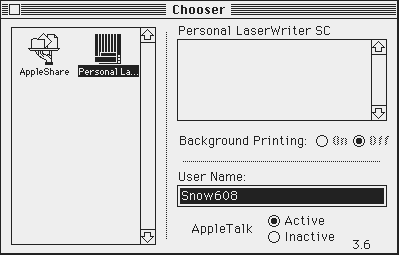
The driver will scan the SCSI bus every time you print something (scan order: 4, 3, 2, 1, 0, 6, 5).
It means that as long as a compatible driver is installed, you can attach a printer and it will work without restarting the Mac.
Printing
Printing is done like you would do with a real LaserWriter IISC.
Snow saves a PNG file with the current time and date (e.g. Snow print 2026-05-02 19:52:02.png) to your desktop.